
As your quality management system (QMS) grows, keeping navigation intuitive becomes essential. AlisQI lets you customize the navigation structure so your team can always find what they need quickly.
The AlisQI navigation bar consists of three elements:
- Analysis sets
- Analysis set groups
- Top level menu
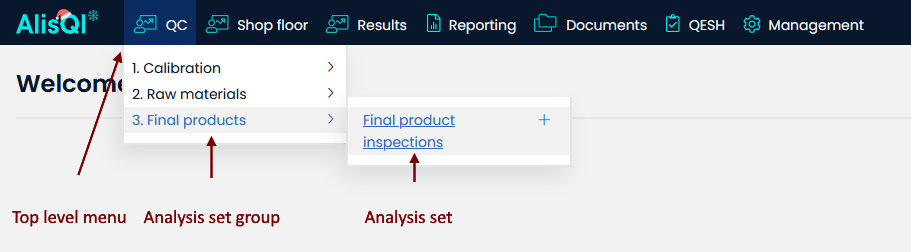
Analysis sets
Analysis sets are the forms used to record transactional quality data. Learn all about designing and creating analysis sets in the Data modeling and Form editor articles.
Analysis set groups
Each analysis set is assigned to exactly one group. This one-to-one assignment means an analysis set cannot appear under multiple groups simultaneously. Groups are used to bundle related analysis sets together, making it easier to navigate your QMS.
Groups are managed via **Management » Analysis set groups**.
Analysis sets are assigned to groups in the Form editor.
Top level menu
The Top Level Menu (TLM) lets you add and organize top-level sections in the navigation bar.
Navigate to **Management » Analysis set groups** to assign a Top Level Menu to any group.
By specifying a Top Level Menu for an analysis set group, you assign all analysis sets in that group to either a new or an existing top-level menu section.
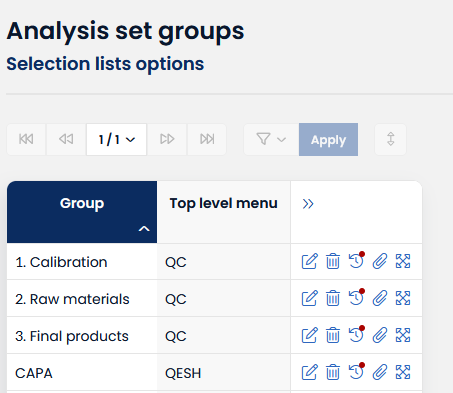
If you leave the Top Level Menu field empty, the group is placed in the **Results** top-level menu by default.